top of page

SEE HOW IT WORKS
One request.
Five people.
One record.
Follow a single costume payment from the advisor who asks for it to the auditor who checks it a year later. Same record, five different jobs.
THE PATH A REQUEST TAKES
01
Request
Purpose, amount and backup captured at the start.
02
Approval
Named, timestamped, kept with the transaction.
03
Payment
Cannot run ahead of the authorisation.
04
Record
Audit-ready without anyone assembling it.
THE SAME REQUEST, THREE JOBS
Request 1042 — Drama Club costume payment,
$480.
Nobody sees a different truth. They see the parts of the same record their role is responsible for.


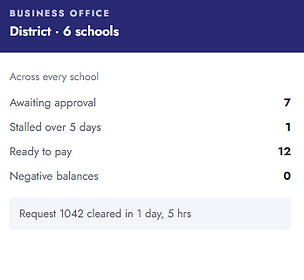
Sample data. Your district defines who approves what, and at which amounts.
WHERE ACCOUNT TREE FITS
“Don’t we already have this?” — the honest answer.
Next to your ERP
We are not your general ledger.
Your district accounting system holds the books. It was never built to run approvals for a yearbook fundraiser across twelve advisors. Account Tree manages that process and hands you clean totals.
Next to your bank
We are not where the money sits.
The bank tells you a payment cleared. It cannot tell you who authorised it, whether the backup existed, or whether the same thing happened at the other five schools.
Instead of the spreadsheet
This is the part we replace.
The workbook one person maintains, the paper forms in the drawer, the approval that lives in an email thread. That is the gap, and it is where findings come from.
WORKS WITH WHAT YOU RUN
Slots in beside your existing systems.
Online payments flow in, totals flow out to your district accounting system. Nobody re-keys anything.
Before your IT review asks
Built to pass the district review, not just the demo.
Role-based access, every action attributable
Approval history retained with the transaction
Student data handled under district policy
bottom of page